

Known blind spots in automatic detection, and the columns to check first
Where a file goes during processing is a separate question from whether everything in it was found. How browser-local file processing works—and how to verify it covers the first question; this post is about the second. A file can stay on your machine from first byte to last and still leave, in its exported "safe" copy, carrying a name the detector never saw.
Detection is pattern matching
Automatic PII detection, in Data Alias as in comparable tools, is a collection of patterns. Cell scanners match shapes: the @ and dot of an email address, the digit runs of phone and card numbers, the fixed openings of known credential formats. Column classifiers read headers, which is how a column called customer_name comes to be proposed for aliasing. Optional name models, trained on examples, estimate whether a string is a person. Each layer catches what it was built to match, and a value that arrives in a shape nothing was built to match passes through all of them.
That boundary is measurable, and we measure it. The detection benchmark runs the pattern layer against a seeded synthetic dataset and publishes every score, including the weak ones. The email row is the clearest illustration of the whole argument: recall 0.50, which decomposes into 18 of 18 plain addresses found and 0 of 18 written as "name at example dot com". One unanticipated format accounts for the entire miss. IBANs score 0.667. The header classifier reads 24 of 27 columns correctly. The point of publishing the weak rows is that they are the honest shape of pattern matching, not an implementation detail waiting to be fixed.
Data Alias states this in the dialog that appears before export whenever detectable values would leave a file unprotected:
Data Alias reduces exposure risk but cannot guarantee detection of every sensitive value. Review the result before sharing it.
That sentence describes the software class, and the interface is worded to match it: column classifications on the Review screen read "Suggested: Person data" or "Suggested: Email," and each suggestion can be corrected with a click. The rest of this post is about where the patterns run out, and which columns deserve your review minutes first.
What the patterns miss
The first three cases below are true misses against the detectors Data Alias ships today; each sits just past the boundary of a real pattern in the code. The last two are misses for every pattern-based tool, because no cell-level pattern for them exists at all.
A misspelled name in a notes column. The cell scanners match emails, phone numbers, IP addresses, and credential formats. A bare name is none of those. Names are normally caught at the column level — a column headed customer_name gets flagged for aliasing — and on-device name detection, an opt-in Pro model you download yourself, can go further inside free text. But "Jon Smth," typed into a memo field by a support rep in a hurry, has no header to give it away, and a name model trained on clean spellings can slide past the typo. There is no reliable pattern for "this string is a person." What those models cost to run inside a browser tab, and what stays unmeasured about them, is in Why our in-browser name detector is 14 MB, not 11.
An address inside a free-text note. "Package left with neighbor at 14 Elmwood Terrace" contains no @ sign, no digit run shaped like a phone number, nothing a regex can anchor to. Address columns are suggested from their headers; an address that wanders into a comment column has left the territory the patterns cover. It reads as ordinary prose, because it is ordinary prose.
A credential in an unfamiliar format. Keys and tokens from the major platforms announce themselves: each begins with a few fixed characters that mark what kind of key it is, and the detectors match those openings. A smaller vendor, or a system built in-house, may issue tokens that follow no such convention, and a format the detectors hold no pattern for is invisible to them on the day it appears. The export check does flag long, jumbled strings it cannot classify as "worth a look," and that flag is an invitation: only you can tell an internal hash from a secret.
A combination of ordinary values. An age, a postcode, a job title, a start date — none is sensitive alone, and none matches any PII pattern. Detection examines one cell at a time and has no concept of what the columns say together. Yet a rare title beside a small-town location beside an exact date can narrow a row to one person while every name in it wears an alias.
This is re-identification by combination, and it has been measured. Philippe Golle's Revisiting the Uniqueness of Simple Demographics in the US Population (WPES'06) recomputed a well-known earlier estimate against 2000 census data and found that gender, five-digit ZIP code, and full date of birth uniquely identify 63% of the US population — down from the 87% the earlier study reported, and still a majority from three columns no PII detector would flag. Coarsening either attribute collapses the risk: hold the ZIP code and reduce the date to a year of birth, and uniqueness falls from 63.3% to 0.2%; keep the full date but widen the location to a county, and it falls to 14.8%. Precision is the whole story, which is why an exact date column deserves more suspicion than it usually gets. No cell scanner is positioned to see any of this.
A story only one person lived through. A ticket describing the customer whose order was delivered to a lighthouse during the March storm names nobody and matches nothing. Whether that sentence identifies someone depends on who reads the copy and what they already know — a judgment about context, which pattern matching does not attempt.
False negatives and false positives
The five cases above are false negatives: sensitive values the scan let through. Detection also fails in the opposite direction. A column headed name sometimes holds product names, which the classifier will propose as person data. A customer_id or order_id column is sometimes the join key an entire analysis depends on. A digit run shaped like a phone number is sometimes an order reference. These false positives leak nothing, but accepting them unexamined damages the copy: a product catalog turned into PERSON codes, a join key aliased away from the file you meant to match it against.
The benchmark measures this direction too, and the phone and card detectors are where it shows: both score 1.0 recall against 0.643 precision, meaning they find every real value and also flag a number of digit runs that are not what they look like. Luhn-valid sequences sitting inside other identifiers get read as card numbers. That trade is deliberate — a detector tuned to miss nothing will over-flag — but it is the reason the Review screen proposes rather than decides.
The two failure modes show up differently, so they call for different responses. A false positive is visible — it sits on the Review screen wearing a suggestion label, and correcting it takes a click: change the type, change the rule, or switch protection off for that column. A false negative appears nowhere. No card, no count, no label; it is found by reading the data, or it stays in the export. That asymmetry should decide how review time is spent: flagged columns mostly need a confirming glance, and the unflagged remainder is where the careful minutes go.
What the export warning does — and does not do
A second scan runs at export time, independent of the rules you set: it reads the output rows and reports what would leave the browser unprotected.
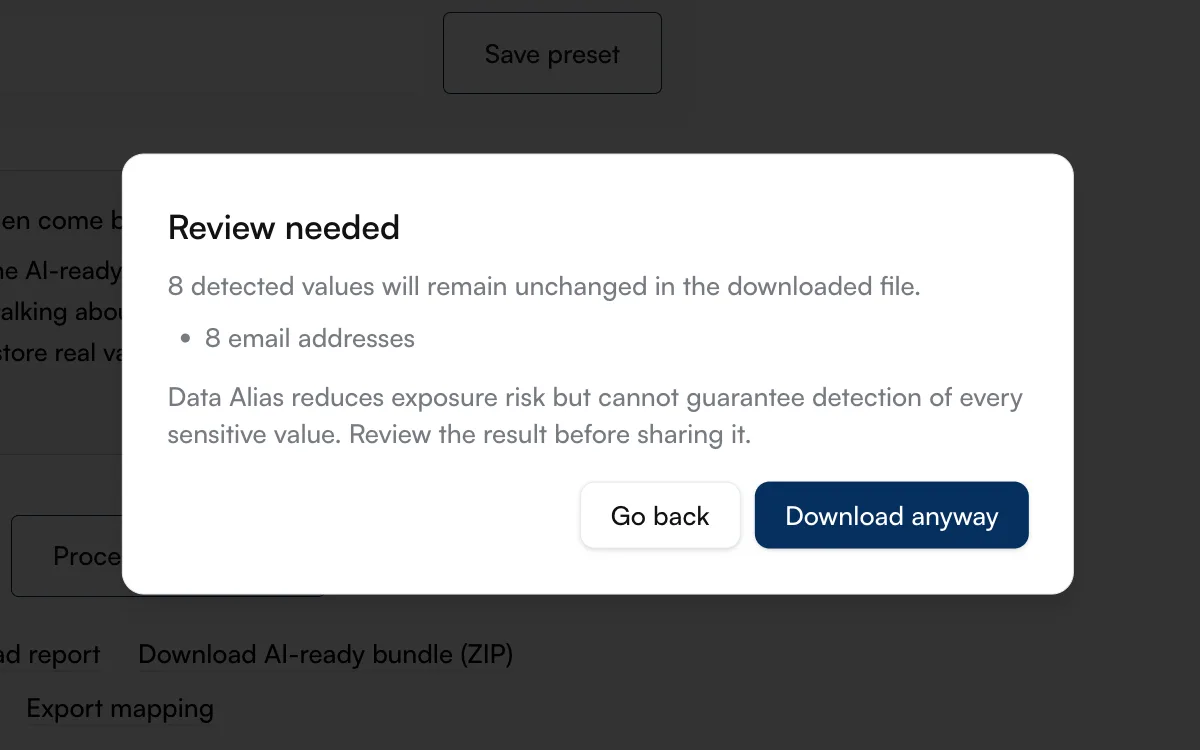
The screenshot shows the result on the sample dataset with the email column deliberately set to Keep: "8 detected values will remain unchanged in the downloaded file," with one line of detail — 8 email addresses. The dialog reports types and counts and keeps the values themselves off screen, since a warning that displayed the actual emails would be one more place they appear. The same scan counts anything slated for protection that still appears verbatim in the output, and lists any suggested column whose protection you switched off, by column name only.
Severity decides which button you get. Detected emails, phone numbers, or names left unprotected can be confirmed past: you see the counts, you choose "Download anyway," and the export proceeds as your decision. Credential-class patterns are treated harder, and the class is wider than API keys alone — keys and tokens, but also national identification numbers, payment card numbers, and IBANs. One of those left unreviewed disables the download button entirely, and the dialog offers "Go back and fix rules" instead. The asymmetry is deliberate: a leaked email address is a problem, and a leaked access token or card number is a different order of problem.
The boundary of all this is the same one the whole post is about: the warning runs the same pattern detectors, this time over the output. It cannot count a misspelled name it holds no pattern for, it cannot see that a job title, a location, and a date combine to identify someone, and it has no opinion on whether a free-text anecdote is recognizable. A dialog with nothing to report means no known pattern remains unprotected in the file; the misses documented above are exactly the things it stays silent about.
Where to look first: a review checklist
Review time is finite, so aim it where false negatives concentrate. For what this review looks like on a real file, How to prepare support tickets for AI analysis without sending direct identifiers walks a nine-row export through it. On your own file, work down this list:
- Notes, memo, and message columns. Free text is where misspelled names, in-text addresses, and one-off stories live. Read a sample of actual cells, weighted toward the long ones; the header tells you nothing here.
- Columns with unhelpful headers.
col_7,data, an unlabeled trailing column: no header-based suggestion was possible, so these were judged by cell patterns alone. Open them and check what they actually contain. - Long, jumbled strings. Anything flagged "worth a look," plus anything resembling a token from an internal system. Decide deliberately whether each is a harmless reference or a secret.
- Columns you switched off. Each was suggested for protection once. Confirm that the reason you overrode it still holds for this copy and this recipient.
- Rare combinations across a row. Scan whole rows as well as single cells: an unusual role plus a location plus a precise date, an age beside a postcode, a sequence of events with one plausible protagonist. If a row would let a colleague guess the person, treat it as identifying, whatever the aliases say.