

Aliasing a ticket export step by step, with the checks that matter at each stage
Why the message column is the risk
The standard precaution before sharing a ticket export is column surgery: drop customer_name, drop customer_email, send the rest. The structured columns are the easy part, though. The message column is where customers type whatever they want, and what they want is often "you can reach me at dana.kim@brightmail.example or 415-555-0132 if you need more details." Remove every structured identifier and that sentence still travels with the "clean" file.
The walkthrough below takes a small export through Data Alias, from loading the file to downloading the reviewed copy. At every step the tool proposes and you confirm, so each section names the judgment you are actually making, alongside the clicks.
The sample file
tickets.csv has four columns — ticket_id, created, customer_email, message — and nine rows, several of which carry contact details inside the message text. The shape is deliberate: an id column an analysis wants intact, a date column for timelines, one direct-identifier column, and free text. Real exports have the same shape, with more rows.
Step 1 — Load the export
Drop the file onto the dropzone, or pick it with the file button. The dropzone states its terms before anything happens: which formats it takes, the 10 MB cap, and "Nothing is uploaded." Parsing and everything after run inside the browser tab; How browser-local file processing works—and how to verify it shows the offline test if you want to confirm that on your own machine.
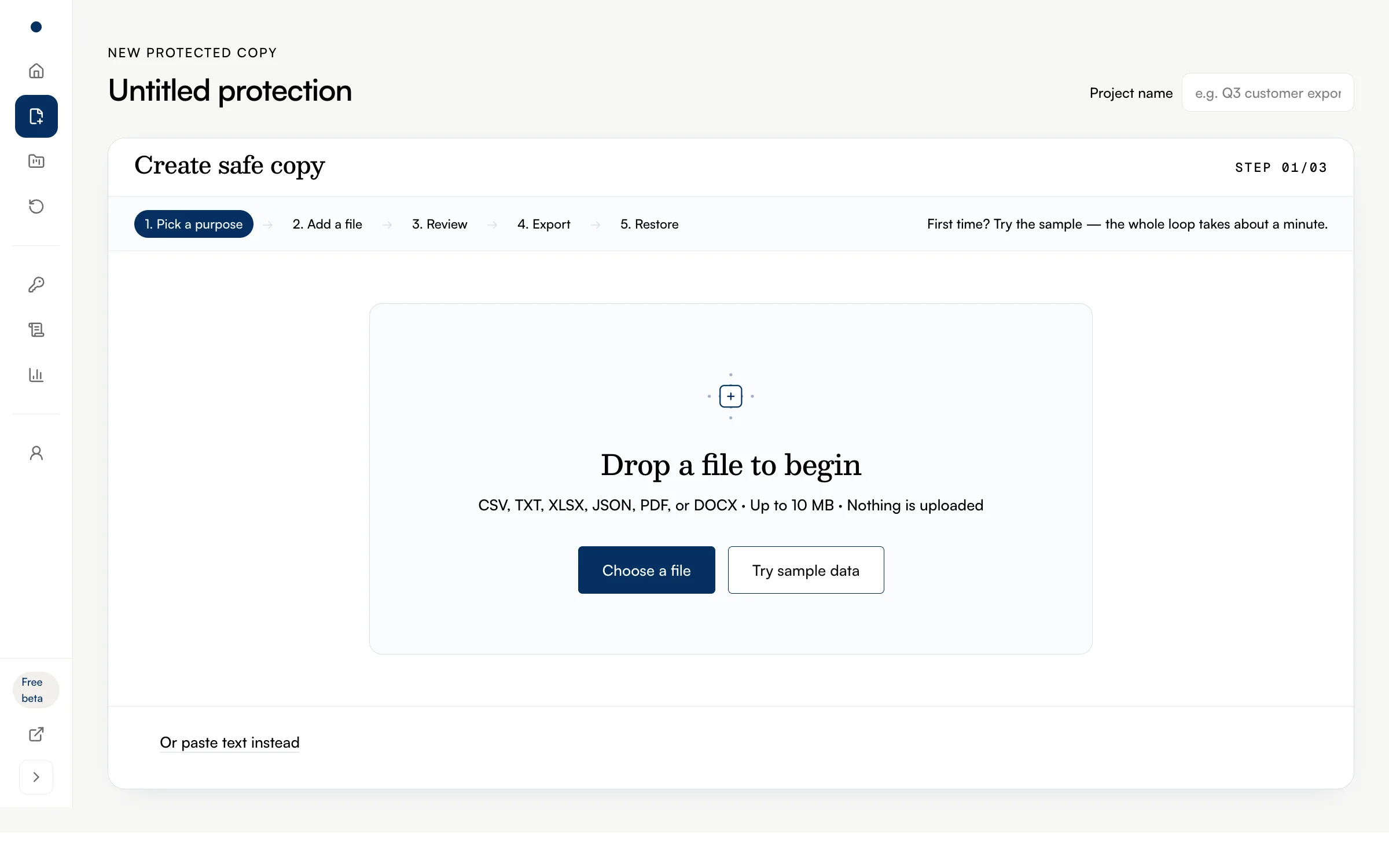
A real file goes straight to the review screen the moment parsing finishes. The check at this stage is quick: the review screen should list all four columns under their own headers, so that the rules you set next attach to the right data. A delimiter or header problem shows up here, before any rule has done anything.
Step 2 — Review what was detected
The review screen opens on a summary of what the scan found: 14 values across the nine rows — every address in customer_email, plus four more emails and a single phone number typed into message bodies. Each column gets a card with a suggested type and a rule. Two arrive protected: customer_email ("Suggested: Email," rule Alias) and message. The other two, ticket_id and created, are plain text with nothing detected inside, so they pass through unchanged — the preview marks them "Kept as-is."
The first judgment is about those unprotected columns. Ids and dates surviving intact is what keeps joins and timelines working on the copy, but the suggestion is only a suggestion: an id that encodes something meaningful outside your own systems deserves a closer look than a pure join key, and the rule card lets you protect it if it does.
The second judgment is the message rule. The column header matches no known type, but the cell scan found contact details in the prose, so the column comes up with protection already on and the rule set to "Alias detected values." The rule replaces each detected value where it stands: "My colleague (r.osei@quartzmail.example) can't accept the invite I sent" becomes "My colleague (EMAIL_006) can't accept the invite I sent." The sentence keeps its meaning without the contact detail. What you are deciding is whether in-place aliasing is enough for this column; the dropdown swaps it for Mask, Remove, or Keep, and the switch turns protection off entirely.
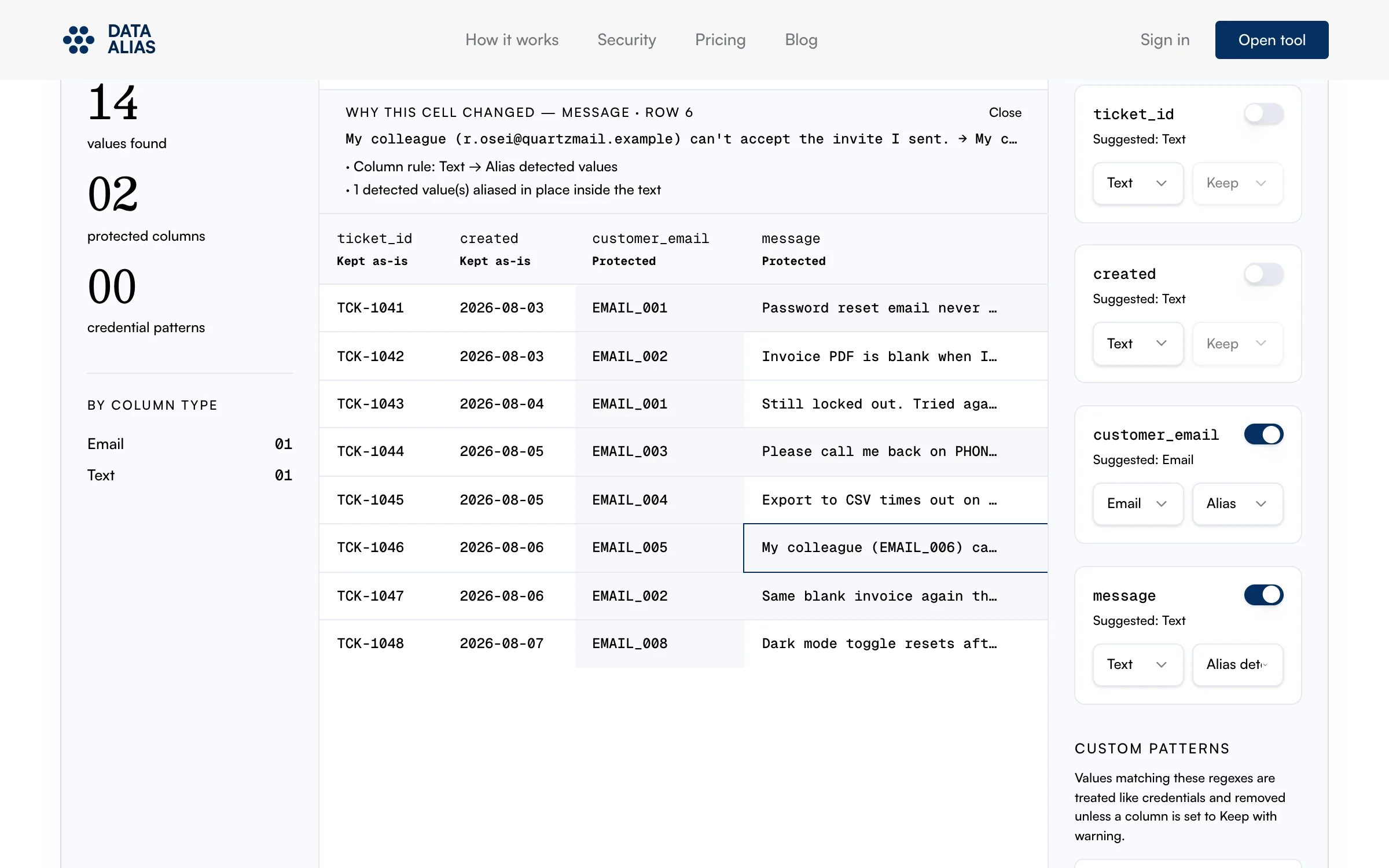
The third judgment is consistency, and the preview is where to confirm it. The same original value becomes the same alias wherever it appears — deterministic aliasing, the property the later analysis depends on. The address in the customer_email column and the same address typed into a message body both come out as EMAIL_001, and three of the nine tickets collapse onto that one alias — the repeat-contact structure the analysis in a later section depends on.
The preview defaults to the Safe copy view, computed by the same engine that will produce the export, with an Original toggle beside it. Click any cell and a strip explains why it changed — the column rule, and how many values were aliased in place inside the text. Spend your spot checks where the risk sits: a few cells the scan flagged, to see that the replacement kept the sentence readable, and a few it did not flag, to see whether anything identifying is still sitting there.
Step 3 — Export and confirm what remains
Create safe copy runs the transform and lands on the result screen: how many values were protected (14 here), per-column counts, and a structure check confirming nothing else moved — nine rows kept, four columns kept. Compare those numbers with what you accepted in review; a count you did not expect means a rule reached further than intended, and the place to fix it is back on the rule card.
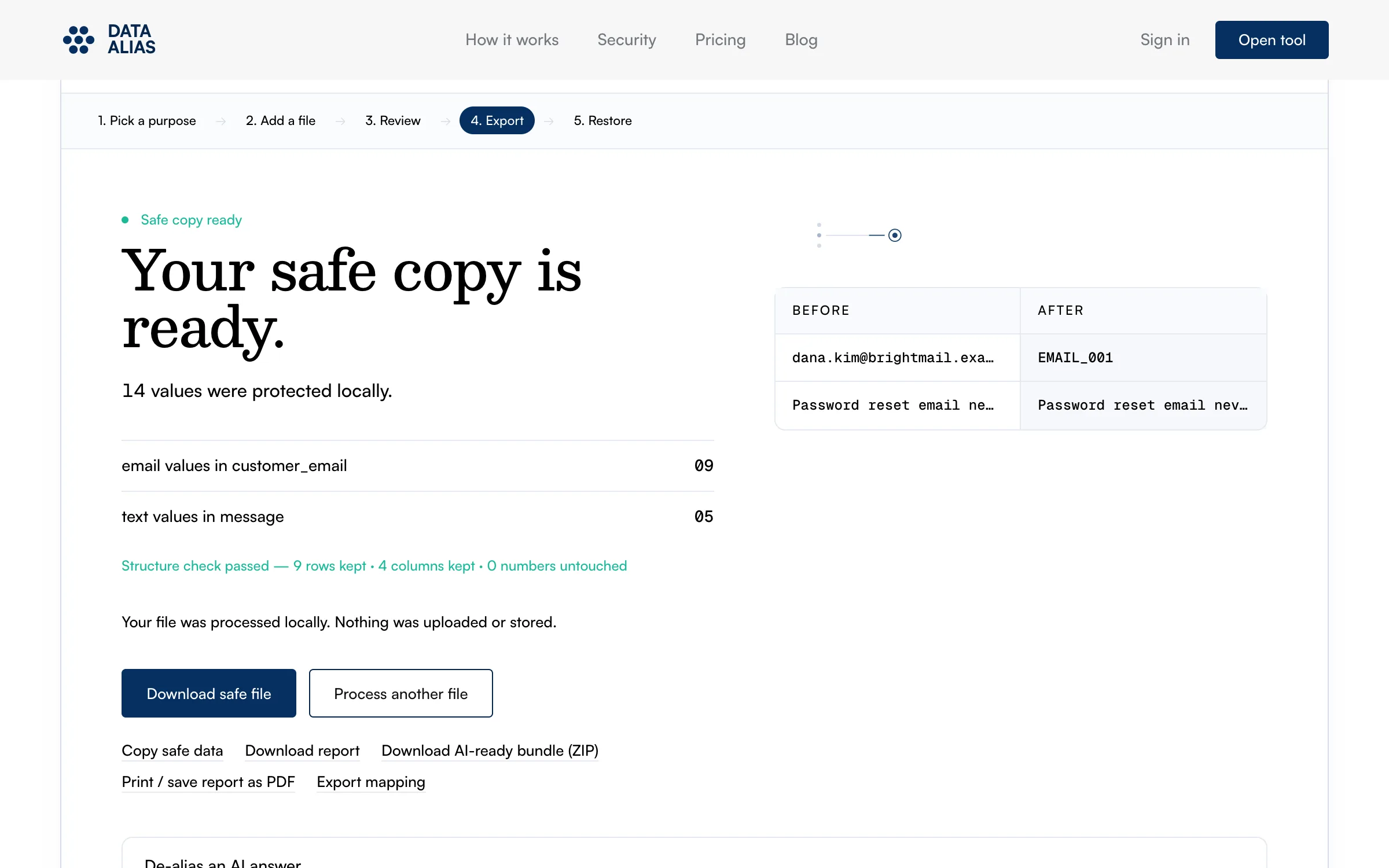
With the rules left at their defaults, Download safe file starts the download at once — no detected value is left in a Keep state, so there is nothing for a warning to count — and tickets.safe.csv lands in your Downloads folder while the original stays where it was, byte for byte. If you loosened a rule during review, the button checks with you first. Set customer_email to Keep, for example, and it opens a "Review needed" dialog before writing anything: "9 detected values will remain unchanged in the downloaded file," itemized underneath as 9 email addresses. The dialog is counting the consequences of your own rule change. Go back and tighten the rules, or choose "Download anyway" if the exception is one you can defend.
Prompts that work on an aliased copy
Three prompts that run fine on tickets.safe.csv:
- "Group these tickets by underlying issue and rank the groups by volume. Which customers appear more than once, and about what?" EMAIL_001's three tickets cluster on their own.
- "Using the created dates, trace how the tone of repeat customers changes between their first and their last message." The dates passed through untouched, so the timeline is the real one.
- "Which of these tickets could documentation have prevented? Draft the two FAQ entries that would have saved the most volume." The issue groups from the first prompt carry most of this one.
All three lean on knowing which rows belong to the same customer, and consistent aliases preserve exactly that. The customer's actual name or address never enters into it: grouping, tone over time, and FAQ mining read the same on EMAIL_001 as on a real address. Analyses that do need identities — contacting a customer, joining against a CRM — are a different job, done on the original inside your own systems. Redaction vs. pseudonymization: which keeps your spreadsheet useful? works through why blanket [REDACTED] breaks this class of analysis while aliases keep it intact.
Limits
Free text is where pattern matching runs out: an email has a shape, "ask for Dana in billing" does not, and values like that pass through untouched. The full inventory of what slips past, and the columns to check first, is in What automatic PII detection misses in spreadsheets.
Aliasing handles the values the scanner can see. It does not change the story a ticket tells: a customer described as the only bakery owner in a named small town, writing on a specific date about a specific order, may be recognizable to anyone who knows the account even with every alias in place. Before export, read the message bodies for details that identify someone by circumstance rather than by name. On nine rows that reading is a glance; on a real export, budget minutes for it, in proportion to where the file is headed.
A checklist before you upload
When the copy is bound for an AI service, run down this list against the actual file in your Downloads folder:
- The file you are about to send is the
.safe.csvcopy — the original export is not attached anywhere in the same message or form. - The structure check matched the original: nine rows and four columns here, your own counts on a real file.
- Every unprotected column is one you decided about — ids and dates the analysis needs, nothing that identifies a person.
- If a "Review needed" dialog appeared, the values it counted are exceptions you chose and can explain.
- You have read the message bodies for circumstantial detail — the kind of story that points to a customer without naming one.
- The service receiving the file is one your organization allows for customer-derived data, under the account settings you meant to use.